Merge Sort
Time Complexity |
Space Complexity |
|
Average |
O(n * log(n)) |
O(n) |
Worst |
O(n * log(n)) |
|
Best |
O(n * log(n)) |
|
Merge Sort is an efficient sorting algorithm. It’s on the longer side, so you don’t need to memorize it, but it would be good to know the general idea. The sort revolves around the idea that it’s easy to combine two sorted arrays into a larger sorted array (compare objects from both arrays, add the object that is smaller to the new array, repeat). So, essentially, to use that to sort an array we:
Split the array in two
Keep splitting the subarrays until each array has one object
“merge” these smaller arrays until we have one large sorted array
Here is a picture example of this process, from top to bottom:
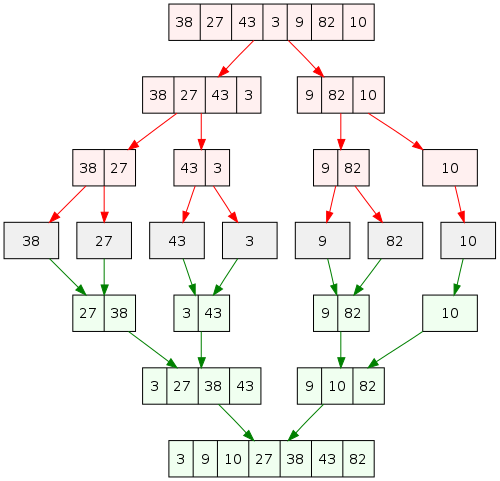
The array is continuously split, then merged back together. If you don’t get the picture, here’s a German dance in motion:
To put the idea into practice, it’s easiest with recursion (where these ideas are functions that call themselves). As a result, there should be a “merge” function that takes two arrays and a “sort” function that splits arrays and calls the “merge” function (and itself).
This example is also “stable”, meaning equal values have the same relative order after sorting. See this page for an explanation of that.
So, in summary, and even more plain English, the code consists of:
Start of mergeSort: if the array is larger than one element, split it in half
merge: take two sorted arrays and combine them, sorted
end of mergeSort: call “merge” on the two arrays we now have, which have “mergeSort” called on them, splitting and sorting them further
That last part might take a minute to understand, but just know all the “splitting” happens before the “merging” because of the way it is written.
#include <iostream>
#include <vector>
using namespace std;

vector<int> merge(vector<int> leftArr, vector<int> rightArr){
  vector<int> result;
  int left = 0;
  int right = 0;
  while(left < leftArr.size() && right < rightArr.size()){
    if(leftArr[left] < rightArr[right]){
      result.push_back(leftArr[left]);
      left++;
    }else{
      result.push_back(rightArr[right]);
      right++;
    }
  }
  result.insert(result.end(), leftArr.begin() + left, leftArr.end());
  result.insert(result.end(), rightArr.begin() + right, rightArr.end());
  return result;
}

vector<int> mergeSort(vector<int> array) {
    if (array.size() <= 1)
        return array;
    int middle = array.size() / 2;
    vector<int> left, right;
    left.insert(left.end(), array.begin(), array.begin() + middle);
    right.insert(right.end(), array.begin() + middle, array.end());
    return merge(mergeSort(left), mergeSort(right));
}

int main(){
    vector<int> vect{54, 3, 134, 5, 1, 98, 1531, 32};  //c++ 11
    for (int i = 0; i < vect.size(); i++)
        cout << vect[i] << "  ";
    cout << endl;
    vect = mergeSort(vect);
    for (int i = 0; i < vect.size(); i++)
        cout << vect[i] << "  ";
    cout << endl;
    return 0;
}
using System.Collections.Generic;

class Program
{
  static List<int> merge(List<int> leftArr, List<int> rightArr){
    var result = new List<int>();
    int left = 0;
    int right = 0;
    while(left < leftArr.Count && right < rightArr.Count){
      if(leftArr[left] < rightArr[right]){
        result.Add(leftArr[left]);
        left++;
      }else{
        result.Add(rightArr[right]);
        right++;
      }
    }
    result.AddRange(leftArr.GetRange(left, leftArr.Count - left));
    result.AddRange(rightArr.GetRange(right, rightArr.Count - right));
    return result;
  }
  static List<int> mergeSort(List<int> array) {
    if(array.Count <= 1)
      return array;
    int middle = array.Count / 2;
    var left = new List<int>();
    var right = new List<int>();
    left.AddRange(array.GetRange(0, middle));
    right.AddRange(array.GetRange(middle, array.Count - middle));
    return merge(mergeSort(left), mergeSort(right));
  }
  static void Main(string[] args)
  {
    var list = new List<int> {54, 3, 134, 5, 1, 98, 1531, 32};
    System.Console.WriteLine(System.String.Join(", ", list));
    list = mergeSort(list);
    System.Console.WriteLine(System.String.Join(", ", list));
  }
}
import java.util.*;

public class mergeSorting {
  public static List<Integer> merge(List<Integer> leftArr, List<Integer> rightArr){
    List<Integer> result = new ArrayList<>();
    int left = 0;
    int right = 0;
    while(left < leftArr.size() && right < rightArr.size()){
      if(leftArr.get(left) < rightArr.get(right)){
        result.add(leftArr.get(left));
        left++;
      }else{
        result.add(rightArr.get(right));
        right++;
      }
    }
    result.addAll(leftArr.subList(left, leftArr.size()));
    result.addAll(rightArr.subList(right, rightArr.size()));
    return result;
  }
  public static List<Integer> mergeSort(List<Integer> array){
    if(array.size() <= 1)
        return array;
    int middle = array.size() / 2;
    List<Integer> left = new ArrayList<>();
    List<Integer> right = new ArrayList<>();
    left.addAll(array.subList(0, middle));
    right.addAll(array.subList(middle, array.size()));
    return merge(mergeSort(left), mergeSort(right));
  }
  public static void main(String[] args) {
      List<Integer> numbers = new ArrayList<>(Arrays.asList(54, 3, 134, 5, 1, 98, 1531, 32));
      System.out.println(numbers);
      System.out.println(mergeSort(numbers));
  }
}
function mergeSort(array) {
  if(array.length <= 1)
    return array;
  var middle = Math.floor(array.length/2);
  var leftHalf = array.slice(0, middle);
  var rightHalf = array.slice(middle);
  function merge(leftArr, rightArr){
    var result = [];
    var left = 0;
    var right = 0;
    while(left < leftArr.length && right < rightArr.length){
      if(leftArr[left] < rightArr[right]){
        result.push(leftArr[left]);
        left++;
      }else{
        result.push(rightArr[right]);
        right++;
      }
    }
    return result.concat(leftArr.slice(left)).concat(rightArr.slice(right));
  }
  return merge(mergeSort(leftHalf), mergeSort(rightHalf));
}
var numbers = [1, 4, 2, 8, 345, 123, 43, 32, 5643, 63, 123, 43, 2, 55, 1, 234, 92];
console.log(numbers);
console.log(mergeSort(numbers));
def mergeSort(arr):
  if len(arr) <= 1:
    return arr
  middle = len(arr) // 2
  leftHalf = arr[0:middle]
  rightHalf = arr[middle:len(arr)]
  def merge(leftArr, rightArr):
    result = []
    left = 0
    right = 0
    while(left < len(leftArr) and right < len(rightArr)):
      if(leftArr[left] < rightArr[right]):
        result.append(leftArr[left])
        left += 1
      else:
        result.append(rightArr[right])
        right += 1

    result = result + leftArr[left:len(leftArr)] + rightArr[right:len(rightArr)]
    return result

  return merge(mergeSort(leftHalf), mergeSort(rightHalf))

numbers = [1, 4, 2, 8, 345, 123, 43, 32, 5643, 63, 123, 43, 2, 55, 1, 234, 92]
print(numbers)
print(mergeSort(numbers))
func merge<type: Comparable>(_ leftArr: [type],_ rightArr: [type]) -> [type] {
  var result: [type] = [];
  var left = 0;
  var right = 0;
  while(left < leftArr.count && right < rightArr.count){
    if(leftArr[left] < rightArr[right]){
      result = result + [leftArr[left]]
      left += 1
    }else{
      result = result + [rightArr[right]]
      right += 1
    }
  }
  return result + leftArr[left...] + rightArr[right...]
}

func mergeSort<type: Comparable>(_ array: [type]) -> [type] {
  guard array.count > 1 else {return array}
  let middle = array.count / 2
  let left = Array(array[..<middle])
  let right = Array(array[middle...])
  return merge(mergeSort(left), mergeSort(right))
}

var arr = [1, 4, 2, 8, 345, 123, 43, 32, 5643, 63, 123, 43, 2, 55, 1, 234, 92]
print(arr)
print(mergeSort(arr))
Notes
Note that the merge function is written before the mergeSort function. This is because the
compiler reads code from top to bottom, and so it needs to know what merge takes as parameters
before mergeSort has a chance to call merge.
In c++, concatenation (adding multiple things together) of vectors is done with the insert() method,
with the syntax first.insert(first.end(), second.begin(), second.end()) or vector.insert(positionToInsert, startOfThingYou'reInserting, endOfThingYou'reInserting), with first and
second being vectors. In the merge function, since we have the number of elements already taken from
arrLeft and arrRight stored in left and right, we add those values to the
starting position of the second vector (like leftArr.begin() + left), and so insert
ignores those values as a result.
Note
There is one line marked as C++ 11 here, so add “-std=c++11” after “g++” when compiling if it doesn’t work.
If you’re stuck with an older version of C++, vectors can also be initialized like this:
int arr[] = { 10, 20, 30 };int n = sizeof(arr) / sizeof(arr[0]);vector<int> vect(arr, arr + n);This is largely the same as the C++ operation, except with C#’s “List” instead of C++’s “vector”.
For the number of items in the list, the count property is used (list.count).
To add something to the list, list.Add(thing) is used. To add a list to another list,
list.AddRange(secondList) is used.
To get part of a list, list.GetRange(startIndex, numberOfElements) is used. Notice GetRange
asks for the number of elements to get and not the ending index.
Here, we’re using the “ArrayList” class, because it’s relatively easy to use, can be expanded, and can be converted to other data structures such as a “linked list” through the “list” interface. In other words, you should prefer to use ArrayLists in Java when you can.
To use an arraylist, you can use the line import java.util.*;, getting the “array”, “arraylist”, and “list”
dependencies all at the same time with the star (*) operator.
Because generic type arguments (the list<stuff> parts) can’t use primitive types (like int) in Java,
wrapper types are used instead. Here, instead of int, the wrapper type is Integer, which automatically
casts (converts itself) between the two when necessary, so it works just like an int.
With ArrayList, items are accessed with the syntax list.get(index), and can be set with the syntax
list.set(index, value). Because we are making a new list to return, only the get() method is needed.
Adding items to the end of the list is done with the syntax list.add(item), and adding lists together is done
with the syntax listOne.addAll(listTwo).
Getting part of a list is done with the syntax list.subList(startIndex, endIndex), where the start index
is inclusive but the end index is excluded.
The syntax Math.floor(someNumber) is used to do integer math / round down (e.g. 5/2 = 2 and not 2.5),
which we want when calculating the middle index.
The syntax array.slice(startIndex, endIndex) is used to get part of an array. If there is no end index,
it gets the rest of the array.
The concat() method, used like array.concat(secondArray), combines arrays. So the line
return result.concat(leftArr.slice(left)).concat(rightArr.slice(right)); is returning the result
array combined with any elements in the other arrays not accounted for.
For fun, you can put in words instead of numbers and they will come back alphabetized. This is because JavaScript, like Python, is loosely typed.
The // operator, while usually used for comments in other languages, is for “floored division” in python.
This means that something like 5/2 will return 2, an integer, instead of 2.5, a float, by rounding down (or
“flooring”). This is something we want when calculating a middle index.
The syntax array[number:otherNumber:] is part of Python’s “slice” syntax
that can manipulate an array. The syntax for this is:
array[start : stop : step]
array is your array. start is where the function should start from in the array,
and stop is where it should stop. We don’t really use step here, but we use the other two
to get part of the array.
So, the line result = result + leftArr[left:len(leftArr)] + rightArr[right:len(rightArr)] is adding
any elements unaccounted for in leftArr and rightArr and adding them to result,
completing the merge.
For fun, you can put in words instead of numbers and they will come back alphabetized. This is because Python, like JavaScript, is loosely typed.
Here, we are using a “type alias” (having a word that counts as many types) to make the function accept not only
numbers, but any type that can be compared. The syntax for this is <aliasName: type_describing_things>,
and it’s put right next to func to give that information to the function (the alias can be used
in the parameters as well as the body of the function itself when placed there).
Swift has what is known as “protocols” which define properties or requirements for different things. Here, we are using the “Comparable” protocol, requiring whatever type the alias is to be comparable (functional with less than, greater than, and similar operators). This is better than JavaScript and Python because it will tell you if you are passing types that can’t be compared before compiling, whereas other languages would just give you a runtime error.
In the first line of mergeSort, instead of having a statement like if (!condition), we
can have a guard statement with the syntax guard condition else{false_action} , which
is neater than usual.
Swift’s “slice” syntax is used to get part of an array. It’s used like array[itemsToGet]. In the square
brackets, Swift’s ellipses syntax can be used like [element...] to get everything after a certain element,
and can also be used like [..<element] to get everything up to a certain element (non-inclusive). Similar
expressions with ellipses can be used in ways that behave like you’d imagine.
If you’re super inclined, and this is sort of interesting - there’s usually a bug in implementations of Merge Sort. It doesn’t apply here because this is a recursive version with vectors, where you don’t need to worry about the lower index (always the first index).