Fibonacci Sequence (Memoization)
You may want to see the pages Fibonacci Sequence and Dictionaries first.
The last page on the Fibonacci Sequence showed a simple example of finding Fibonacci numbers, but the example was really inefficient. Here, we are going to make a much faster version with a concept called “memoization”. Not “memorization”, “memoization”. To see why the last one was so slow, here’s a diagram of when we try to find the sixth fibonacci number:
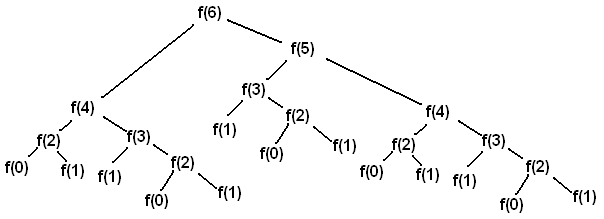
As you can see, this sort of tree would get much larger as we try to find later fibonacci numbers. You can also
see we are finding the same values multiple times - fib(2), for instance, is calculated five times. When
there is a recursive problem like this with repeated calculations, the entire idea of “memoization” is to store
values that are found and use them if they are ever asked for again. That way, we only do each calculation once.
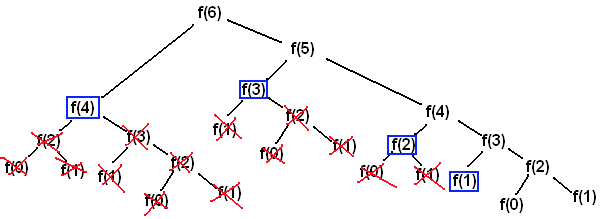
Here is that same diagram, but with repetitions removed:
Images from this page.
You’ll notice that we only do six calculations this time (the blue box represents reading a previous calculation). So, we’ve reduced a problem with O(2^n) calculations down to O(n) calculations, or linear time (here is a page on that: Time and Space Complexities).
While the previous implementation was limited to the 30th or so Fibonacci number because of time, this implementation is only limited by the size of the available integer types. It gets the 64th Fibonacci number in second(s), for example, where the other implementation might have taken hours.
The found values are stored in a Dictionaries.
#include <iostream>
#include <unordered_map>
using namespace std;

long fib(long n, unordered_map<long, long> &memo){
  if(n == 0 || n == 1)
    return n;
  if((memo.find(n) == memo.end()))
    memo[n] = fib(n-1, memo) + fib(n-2, memo);
  return memo[n];
}

long fibMemo(long n){
  unordered_map<long, long> memo;
  return fib(n, memo);
}

int main(){
  cout << fibMemo(64) << endl;
  return 0;
}
using System.Collections.Generic;
class Program{
  static long fib(long n, ref Dictionary<long, long> memo){
    if(n == 0 || n == 1)
      return n;
    if(!memo.ContainsKey(n))
      memo[n] = fib(n-1, ref memo) + fib(n-2, ref memo);
    return memo[n];
  }
  static long fibMem(long n){
    Dictionary<long, long> memo = new Dictionary<long, long>();
    return fib(n, ref memo);
  }
  static void Main(string[] args){
    System.Console.WriteLine(fibMem(64));
  }
}
import java.util.*;
public class fibonacciMem{
  public static long fib(long n, Map<Long, Long> memo){
    if(n == 0 || n == 1)
      return n;
    if(!memo.containsKey(n))
      memo.put(n, fib(n-1, memo) + fib(n-2, memo));
    return memo.get(n);
  }
  public static long fibMem(long n){
    Map<Long, Long> memo = new HashMap<Long, Long>();
    return fib(n, memo);
  }
  public static void main(String[] args) {
    System.out.println(fibMem(64));
  }
}
function fibMem(n){
  var memo = {};
  function fib(m){
    if(m === 0 || m === 1)
      return m;
    if(!(m in memo))
      memo[m] = fib(m-1) + fib(m-2);
    return memo[m];
  }
  return fib(n);
}
console.log(fibMem(64));
def fibMem(n):
  memo = {}
  def fib(m):
    if m == 0 or m == 1:
      return m
    if not (m in memo):
      memo[m] = fib(m-1) + fib(m-2)
    return memo[m]
  return fib(n)

print(fibMem(64))
func fibMem(_ n: Int) -> Int {
  var memo = [Int : Int]()
  func fib(_ m: Int) -> Int {
    if m == 0 || m == 1 {
      return m
    }
    if memo[m] == nil {
      memo[m] = fib(m-1) + fib(m-2)
    }
    return memo[m]!
  }
  return fib(n)
}
print(fibMem(64))
Notes
See the Dictionaries page, for everything related to that.
We have two functions here, one that takes the initial number and creates the dictionary, and the other which is the main recursive function that takes a number and a reference to the dictionary, and calculates / stores results.
Call by reference (&) is used so we don’t make a copy of the dictionary every time
we call the recursive function; that would defeat the purpose of “memoizing” the results.
long here is a number type, just like int, but it can store larger numbers.
See the Dictionaries page, for everything related to that.
We have two functions here, one that takes the initial number and creates the dictionary, and the other which is the main recursive function that takes a number and a reference to the dictionary, and calculates / stores results.
Call by reference (ref, in both the function parameter and function calls) is used
so we don’t make a copy of the dictionary every time we call the recursive function;
that would defeat the purpose of “memoizing” the results.
long here is a number type, just like int, but it can store larger numbers.
See the Dictionaries page, for everything related to that.
We have two functions here, one that takes the initial number and creates the dictionary, and the other which is the main recursive function that takes a number and a reference to the dictionary, and calculates / stores results.
Java doesn’t have anything “called by reference”, only “call by value”. Fortunately, for all objects in Java, the address of the object is passed as the value, so we don’t have to worry about making several unnecessary copies of the dictionary because the original is always used.
long here is a number type, just like int, but it can store larger numbers.
See the Dictionaries page, for everything related to that.
We have nested functions here, the outside one taking the number and making a dictionary, and the inner one which is recursive and calculates/stores the results.
Because javascript is loosely typed (no types such as int are specified), be careful not
to pass in a decimal number because this relies on equality comparisons, which is very not recommended
for floating-point types. To quote Wikipedia,
“The use of the equality test (if (x==y) …) requires care when dealing with floating-point numbers. Even simple expressions like 0.6/0.2-3==0 will, on most computers, fail to be true (in IEEE 754 double precision, for example, 0.6/0.2-3 is approximately equal to -4.44089209850063e-16). Consequently, such tests are sometimes replaced with “fuzzy” comparisons (if (abs(x-y) < epsilon) …, where epsilon is sufficiently small and tailored to the application, such as 1.0E−13).”
See the Dictionaries page, for everything related to that.
We have nested functions here, the outside one taking the number and making a dictionary, and the inner one which is recursive and calculates/stores the results.
Because Python is loosely typed (no types such as int are specified), be careful not
to pass in a decimal number because this relies on equality comparisons, which is very not recommended
for floating-point types. To quote Wikipedia,
“The use of the equality test (if (x==y) …) requires care when dealing with floating-point numbers. Even simple expressions like 0.6/0.2-3==0 will, on most computers, fail to be true (in IEEE 754 double precision, for example, 0.6/0.2-3 is approximately equal to -4.44089209850063e-16). Consequently, such tests are sometimes replaced with “fuzzy” comparisons (if (abs(x-y) < epsilon) …, where epsilon is sufficiently small and tailored to the application, such as 1.0E−13).”
See the Dictionaries page, for everything related to that.
We have nested functions here, the outside one taking the number and making a dictionary, and the inner one which is recursive and calculates/stores the results.
Because dictionaries store values as “optional” values (values that are possibly there),
and we know the value is there, we use the ! operator when returning to force
the value from an optional type Int? to the expected Int.
Swift uses the largest Int type it can by default (32 bit, 64 bit, etc.), so we can just use Int
and it should work for large numbers.

Image from this page.